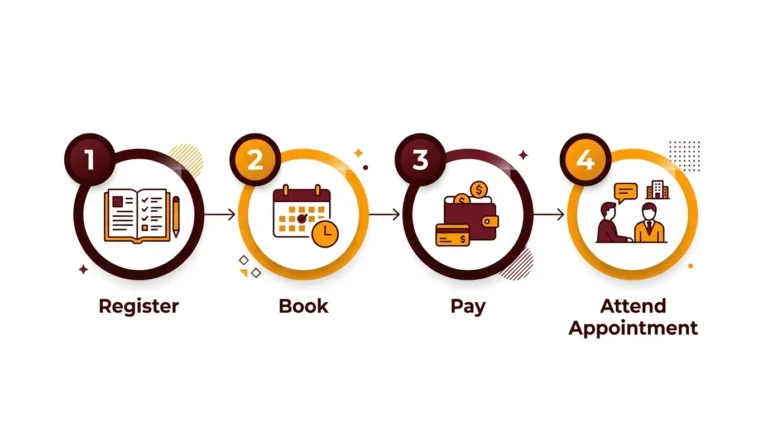
NBI Registration for Clearance and Renewal Online
NBI registration is the first and most important step to getting your NBI Clearance for jobs, visas, business permits, and other government transactions in the Philippines.
When you register correctly online, you avoid long queues, rejected applications, and wasted appointment slots.
What Is NBI Registration?
NBI registration is the formal process of creating your secure online account in the integrated NBI Clearance ecosystem and encoding your personal data before setting a physical appointment slot. This digital repository serves as your permanent profile within the national NBI database, where your biometric scans, historically issued clearances, and subsequent account renewals are permanently linked.
Primary Credentials
Email & Mobile Number
Core Objective
Pre-Registration & Booking
Platform Status
Active 2026 Framework
Instead of completing tedious manual paper forms at a physical branch location, you now handle all primary data entry online from any device. Once your baseline credentials are saved, your physical appearance at your chosen NBI branch center is strictly limited to rapid biometric capture (photo and fingerprints) and document release.
System Requirement Alert: Ensure that the digital contact lines used for account creation are active, verified, and strictly under your control, as transactional updates, login receipts, and reference keys route directly through these targets.
How to Register for NBI Clearance Online
Follow these steps to complete your NBI registration online. The process works seamlessly on both desktop and mobile web browsers.
Go to the Official NBI Clearance Website
Open your browser and navigate to the official NBI Clearance portal matrix (e.g., clearance.nbi.gov.ph or the currently active official domain). Verify the URL string strictly to avoid phishing risks or fraudulent websites.
The homepage will display dedicated parameters for logging in if you maintain an existing profile, and a specialized registration module for fresh applicants.
Choose the Correct Registration Option
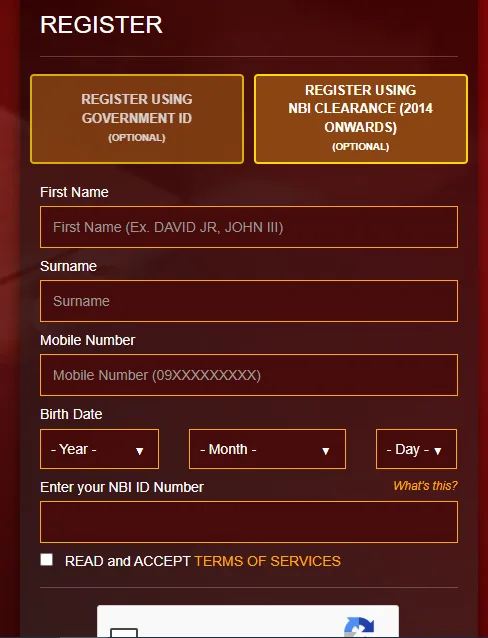
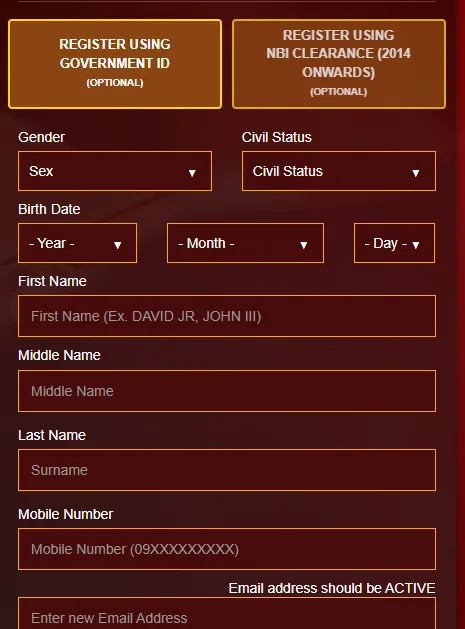
For first‑time users, initialize the sequence by choosing to create a new account. The active system may populate several optimized pathways to begin registration, including:
Utilizing an existing ID or old clearance data minimizes transcription errors in critical fields like your full name and birthdate string. You may still proceed with manual data entry if required.
RA 11261 (First-Time Jobseeker) Alert: Look for the dedicated portal or specific functional button before initializing data capture to access your structural free clearance benefit.
Fill Out the NBI Registration Form Thoroughly
Populating the formal data matrix requires the following comprehensive fields:
Formally accept the transactional Terms of Service and data Privacy Notice, and solve any active system captcha protocols.
Legal Maiden Name Guideline (for women): The ecosystem generally mandates registration under your maiden legal surname string. If specific fields exist for “spouse” credentials, enter married name details there—do not alter your legal maiden identity details in the primary profile vector.
Double-check all entries strictly before clicking “Sign Up” or “Register.”
Verify Your Account via OTP and Email Link
Upon initializing “Sign Up,” the integrated system immediately transmits a One‑Time Password (OTP) text to your recorded mobile number string. Input this operational OTP key within the valid time boundary to authenticate your number.
The 2026 infrastructure may also dispatch an activation link directly to your email inbox. To authenticate access, locate the NBI verification email and execute the embedded link to finalize account activation.
Operational Success Notice: Your specialized NBI online clearance account activates completely *only* once both the Mobile OTP vector and Email Verification path (if required by the current framework) return a success state.
Logging In and Completing Your NBI Profile
Account registration merely establishes your system credentials. The critical next phase requires logging into your active repository workspace to fill out your formal Applicant Information Form, which handles printing verification.
Sign In to Your Active NBI Account
Return to the main login portal interface and authenticate access using your freshly registered email address and account password security code.
Lost access path: If you lose your current credentials, execute the “Forgot Password” auxiliary pathway to trigger a security reset string routed to your verified mobile line or inbox.
Complete the Applicant Information Form
Once routed inside the data control panel, locate the primary profile management section. You must supply your descriptive identity attributes with strict accuracy across these required fields:
Full Name Structure: Must match your legal government ID document strings exactly.
Physical & Social Traits: Sex assignment, civil status, exact height, weight, and religion markers.
Family Background: Mother’s full legal maiden name string and father’s complete name.
Contact Metrics: Active mobile string, primary email, and complete present address variables.
Contextual Elements: Background education and current employment data placeholders (marked optional).
Click the “Save Information” interface control button after ensuring all mandatory target forms possess complete data loops. The platform will automatically route you to a read-only confirmation matrix screen.
Data Validation Rule: Review this layout check screen with intense scrutiny. Transcription layout typos, incorrect birthdate fields, or data variables that contrast with your physical documents will directly cause manual verification bottlenecks, immediate “HIT” matching holds, or necessitate a complete account deletion and re‑registration loop.
Applying for NBI Clearance After Registration
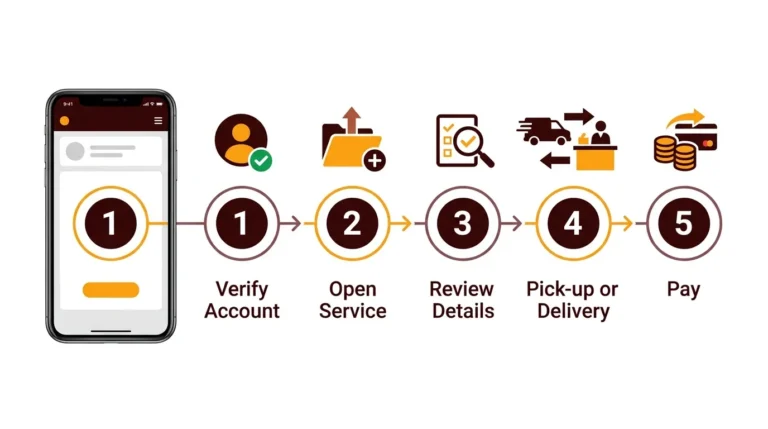
Once your registration parameters and base profile variables are complete, you can deploy your active account workspace to formalize an operational NBI Clearance application and lock down a physical branch schedule.
Security Declaration: This entry serves as your binding formal declaration that you will yield that identical physical identity document to processing agents during biometrics.
Configure Branch Selection and Scheduling
Following form NBI validation, the layout exposes an automated scheduler grid and complete geographic list of processing branches. Choose your parameters strategically:
Preferred NBI Branch: Select the branch center geographically closest to your home base or daily commute paths.
Available Booking Target: Lock down an available timeline block categorized by distinct AM or PM operation slots.
The database layout dynamically reflects active operational quotas. If structural platform upgrades afford you a safety window (for instance, a short grace period extending approximately 15 days from your confirmed booking payment marker), strive to prioritize your explicit scheduled target date to maintain data integrity.
Select Your Payment Vector and Generate the Reference Key
After locking your branch timeline, the engine computes your cumulative outstanding balance (combining the fixed statutory NBI fee alongside the e-payment platform transactional charge). Select your transactional route from the integrated menu list:
Upon transactional authorization, the terminal generates an exclusive, unique alphanumeric text code.
The Reference Number Metric: This system code acts simultaneously as your payment matching indicator and your formal physical gate pass when presenting yourself at the secure entrance of your local NBI facility.
Save the reference number by:
Critical Privacy Measure: Never share your unique reference text layout publicly online or distribute screenshots to external lines to avoid credential spoofing.
NBI Registration for First‑Time Jobseekers
Statutory Waiver Framework: If you are an eligible applicant classified under the protections of the First-Time Jobseekers Assistance Act (Republic Act 11261), the overall enrollment architecture runs parallel to standard channels but pivots on critical operational touchpoints.
Dedicated System Link
You must route your application initialization exclusively through the marked First‑Time Jobseekers section or specific institutional access button embedded on the active online terminal.
Purpose Classification
During data input phases, declare your transactional purpose target metrics accurately by choosing “Local Employment – First Time Jobseeker” or its currently mapped system variant.
Zero‑Fee Processing Rule: Do not complete any digital checkout transactions or process electronic payment channels if the active clearance workspace states your statutory document printing fees are waived subject to localized branch validation.
Physical Branch Verification Routine
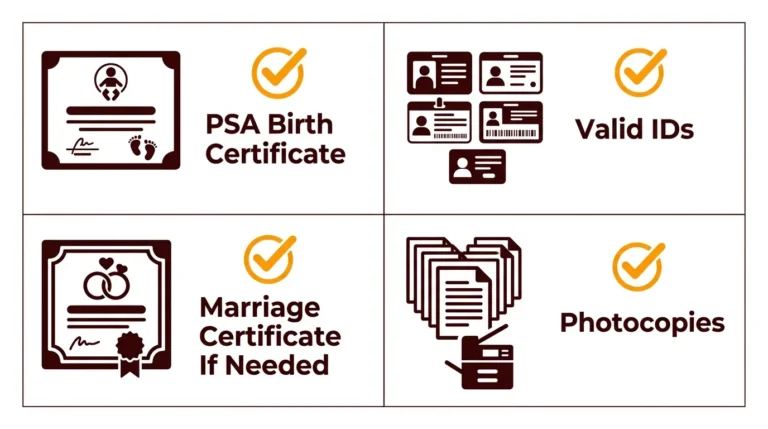
When appearing at your chosen operational verification kiosk for fingerprint capture, you must produce the physical tracking assets needed to trigger your fee exemption:
Once these legal physical materials clear processing desk audits, the desk officer checks off the transaction parameters and waives your full clearance printing processing ledger balance.
NBI Registration Using Old NBI Clearance
If you already hold an NBI Clearance document issued during recent database framework years, updated portal features allow you to fast-track your new profile integration or structural clearance renewal by linking your legacy identifier details.
Select Portal Target: Toggle the specific action prompt reading “Register using old NBI Clearance” or its currently active layout equivalent.
Input Legacy String: Enter the historical NBI ID alpha-numeric number string found printed on your physical legacy document.
Update Migrated Profiles: The portal pulls existing identity fields to auto-populate your draft form. You can modify shifting lifestyle variables like current residential address blocks or civil status items.
Operational Constraint Note: This feature keeps data clean and prevents account duplication. However, you are still required to secure a fresh branch scheduling block, settle the processing transactional balance, and present yourself physically for identity validation steps.
Tips to Avoid Problems During NBI Registration
To ensure your online application tracks cleanly through automated matching engines, maintain strict compliance with these optimization guidelines:
Use Your Full Legal Name
Completely omit personal nicknames, common aliases, or shortened variations. Your text entry must mirror your accompanying valid government ID document text exactly.
Use Your Full Legal Name
Completely omit personal nicknames, common aliases, or shortened variations. Your text entry must mirror your accompanying valid government ID document text exactly.
Maintain Active Channel Vectors
Keep your recorded email inbox and mobile telephone lines active. Essential platform changes, security OTP streams, and operational reminders rely entirely on these targets.
Zero Profile Duplication Policy
Do not create redundant, secondary profiles if you have a registered record. Always deploy security recovery forms to reclaim access to your baseline profile history.
Retain Screen Captures Permanently
Capture screenshots at every critical processing step—specifically archiving generated reference strings, financial payment logs, and final appointment receipts.
Final Thoughts
NBI registration is more than just another online form—it is the foundation of your identity record with the National Bureau of Investigation. When you register correctly:
If you follow the steps above carefully, you can complete your NBI registration in just a few minutes and move on quickly to getting your NBI Clearance for employment, travel, or any important life opportunity that requires a clean record.